Introduction to Applied Data Science

Lecture 7: Spatial Data

Bas Machielsen

Overview

Course Schedule

Event Date Subject
Lecture 1 21-04 Introduction to Data and Data Science
Lecture 2 28-04 Getting Data: API's and Databases
Lecture 3 07-05 Getting Data: Web Scraping
Lecture 4 26-05 Text as Data
Lecture 5 27-05 Introduction to LLMs
Lecture 6 09-06 Prompt Engineering and Structured Data
Lecture 7 16-06 Spatial Data and Geocomputation

Outline Today

  • First part: what spatial data is – the two big families, vector data and raster data.
  • Second part: working with vector data using the sf package.
    • Making maps, coordinate systems, joins, distances, neighbours, and geocoding.
  • Third part: working with raster data using the stars package.
    • Reading grids and summarizing them back to regions.
  • Throughout, we use one running example: the province of Utrecht.

Introduction to Spatial Data

Why Should Economists Care About Location?

  • A lot of economics is, at heart, about where things happen.
    • House prices depend on the neighbourhood; trade depends on distance; shops compete with nearby shops.
  • Imagine you want to open a new coffee bar somewhere in the province of Utrecht. You would want to know:
    • In which town am I if I stand on this spot?
    • How far is the nearest train station?
    • Which neighbourhoods are already crowded with cafés, and which are underserved?
  • A normal spreadsheet of café names and revenues cannot answer any of these.
    • They are all “where” questions, and they need data that knows about location.

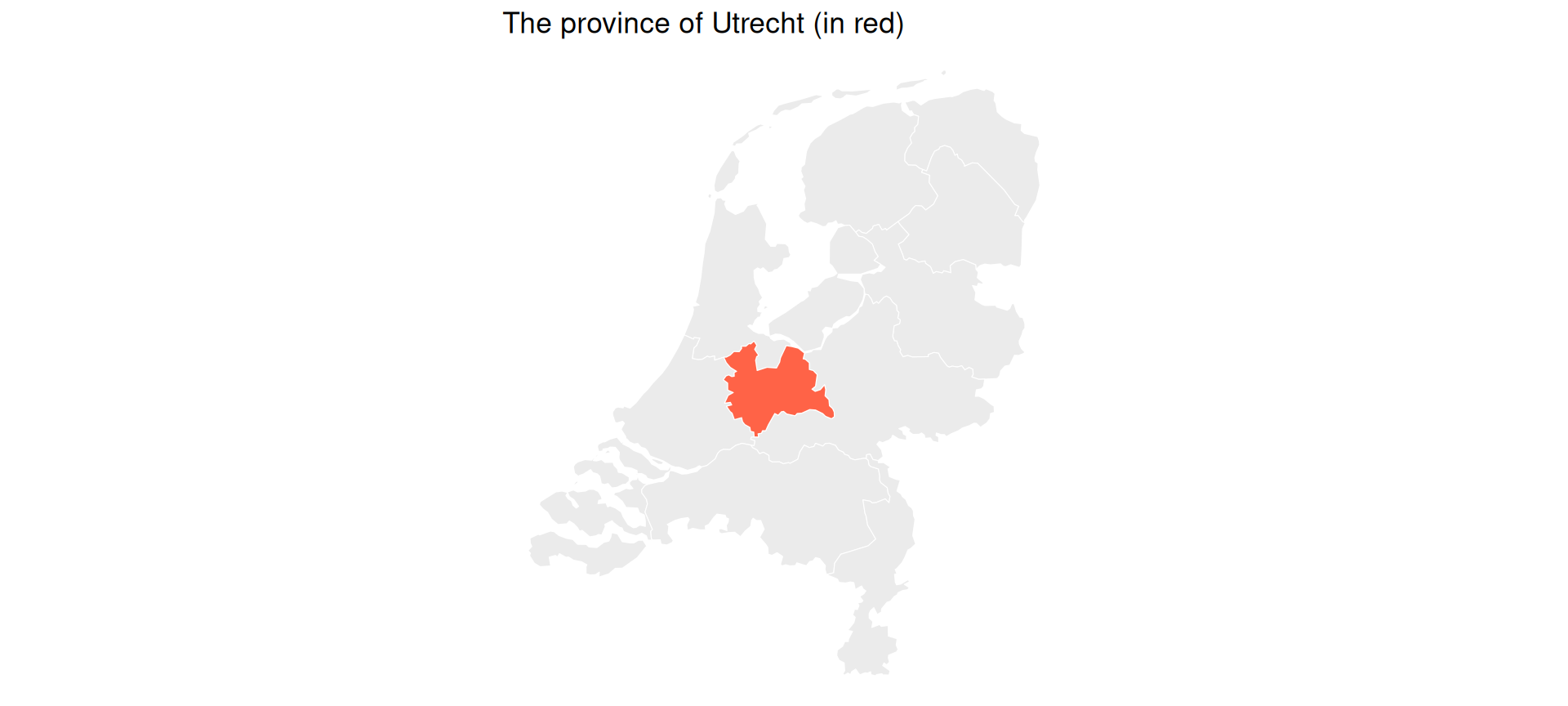
Our Running Example: The Province of Utrecht

  • We will spend most of this lecture in one place: the Netherlands, and especially the province of Utrecht.
  • We will answer increasingly interesting “where” questions about towns, stations, and shops.
What Makes Data “Spatial”?

  • Spatial data is simply data that carries location information: every row knows where it is on the Earth.
  • That little bit of extra information unlocks a whole new set of questions:
    • distance, nearness, what borders what, what lies inside what.
  • These are questions that ordinary tables cannot answer.
  • There are two ways to store location, and almost all spatial data you will ever meet is one of these two kinds:
    • Vector data and raster data.

Vector Data: Discrete Things

  • Vector data represents discrete objects with crisp borders, drawn as points, lines, and polygons.
    • Points: single locations, such as shops, stations, or a person’s home.
    • Lines: connected paths, such as roads, railways, or rivers.
    • Polygons: areas with a boundary, such as municipalities, neighbourhoods, or countries.
  • Think of cookie-cutter shapes: you can zoom in forever and the borders stay sharp.
  • Vector data dominates the social sciences, because human things (towns, firms, roads) tend to have discrete borders.
  • Today we work with points and polygons. We will not build any line layers, but railways and rivers work in exactly the same way.

Raster Data: A Grid of Cells

  • Raster data is a grid of equal-sized cells, like a digital photo with geo-located pixels. Each cell holds one value.
  • Examples:
    • A temperature map (one value per cell).
    • A satellite photo (one brightness value per cell).
    • A population-density surface.
  • Think of a mosaic or an image.
  • It is the natural way to store something continuous that exists everywhere.
    • Temperature does not stop at a town border the way a polygon does.

Vector or Raster? A Quick Rule

  • The choice is almost always obvious once you ask: is this thing discrete or continuous?
If you have… Use
Shops, towns, roads, borders (discrete things) Vector
Temperature, elevation, satellite imagery (continuous) Raster

Vector or Raster? Some Examples

  • For each of these, the question is: vector or raster?
    1. A list of every Albert Heijn supermarket in the Netherlands.
    2. A nighttime-lights satellite image used as a proxy for economic activity.
    3. The borders of all Dutch municipalities.
    4. A map of average rainfall across Europe.
  • Answers:
    1. Vector (points).
    2. Raster (a grid of light values).
    3. Vector (polygons).
    4. Raster (a continuous surface).

The R Toolkit: sf and stars

  • Two R packages do almost everything in spatial analysis:
    • sf (Simple Features): for vector data (points, lines, polygons).
    • stars (Spatiotemporal Arrays): for raster data (grids).
  • Both are the modern standard and both work together with the tidyverse.
    • The older rgdal, rgeos, and maptools packages were removed from CRAN in 2023, and sp is now maintenance-only; you will not need any of them.
  • Along the way we use a few tidyverse tools: the dplyr verbs select(), filter(), and mutate(), and ggplot2 for plotting.
    • We only need a handful, and we explain each one as it appears.

Vector Data with sf

Loading Data: Municipalities of Utrecht

  • Let’s get the municipalities (gemeenten) of the Netherlands from Statistics Netherlands using the cbsodataR package you met in the API lecture.
  • We then keep only the municipalities of the province of Utrecht.
library(sf); library(dplyr); library(ggplot2); library(cbsodataR)

# The municipalities of the province of Utrecht (2022)
utrecht_names <- c(
  "Amersfoort","Baarn","De Bilt","Bunnik","Bunschoten","Eemnes",
  "Houten","De Ronde Venen","Lopik","Montfoort","Nieuwegein",
  "Oudewater","Renswoude","Rhenen","Soest","Stichtse Vecht",
  "Utrecht","Utrechtse Heuvelrug","Veenendaal","Vijfheerenlanden",
  "Wijk bij Duurstede","Woerden","Woudenberg","IJsselstein","Zeist")

# All Dutch municipalities as polygons, then keep the province of Utrecht
gemeenten <- cbs_get_sf("gemeente", 2022)
utrecht <- gemeenten |> filter(statnaam %in% utrecht_names)

ggplot(utrecht) + geom_sf(fill = "grey90", colour = "white") + theme_void()

The Most Important Idea

  • An sf object is just a data frame with a geometry column.
  • It has ordinary columns (like statnaam, the municipality name) plus one special column called geometry that stores the shape.
head(utrecht |> select(statnaam), 3)
Simple feature collection with 3 features and 1 field
Geometry type: MULTIPOLYGON
Dimension:     XY
Bounding box:  xmin: 134996 ymin: 455197 xmax: 161443 ymax: 471643
Projected CRS: Amersfoort / RD New
# A tibble: 3 × 2
  statnaam                                                              geometry
  <chr>                                                       <MULTIPOLYGON [m]>
1 Amersfoort (((155568 470119, 155378 468603, 151128 469628, 150015 468326, 150…
2 Baarn      (((151128 469628, 151470 471154, 149881 471643, 149108 470608, 143…
3 De Bilt    (((143902 464184, 143021 465373, 143263 468477, 141688 465539, 137…
  • Because it is a data frame, the same dplyr verbs work on it.

Selecting Columns

  • select() chooses columns. Here we keep the municipality code and name:
utrecht |>
  select(statcode, statnaam) |>
  head(3)
Simple feature collection with 3 features and 2 fields
Geometry type: MULTIPOLYGON
Dimension:     XY
Bounding box:  xmin: 134996 ymin: 455197 xmax: 161443 ymax: 471643
Projected CRS: Amersfoort / RD New
# A tibble: 3 × 3
  statcode statnaam                                                     geometry
  <chr>    <chr>                                              <MULTIPOLYGON [m]>
1 GM0307   Amersfoort (((155568 470119, 155378 468603, 151128 469628, 150015 46…
2 GM0308   Baarn      (((151128 469628, 151470 471154, 149881 471643, 149108 47…
3 GM0310   De Bilt    (((143902 464184, 143021 465373, 143263 468477, 141688 46…
  • Notice that the geometry column comes along automatically.
    • sf keeps geometry “sticky”, so you never accidentally throw away the location.

Filtering Rows

  • filter() keeps the rows that match a condition. Here we keep only the city of Utrecht:
utrecht_city <- utrecht |> filter(statnaam == "Utrecht")
utrecht_city |> select(statnaam)
Simple feature collection with 1 feature and 1 field
Geometry type: MULTIPOLYGON
Dimension:     XY
Bounding box:  xmin: 126435 ymin: 448770 xmax: 141834 ymax: 461526
Projected CRS: Amersfoort / RD New
# A tibble: 1 × 2
  statnaam                                                              geometry
  <chr>                                                       <MULTIPOLYGON [m]>
1 Utrecht  (((135821 460594, 134458 460873, 132674 459422, 131743 460251, 13070…
  • The filtering works exactly as on a normal data frame; the shape simply comes along for the ride.

Adding Variables: Area

  • mutate() adds a new column. Here we compute each municipality’s area with the spatial function st_area():
utrecht |>
  mutate(area_km2 = as.numeric(st_area(geometry)) / 1e6) |>
  select(statnaam, area_km2) |>
  arrange(desc(area_km2)) |>
  head(4)
Simple feature collection with 4 features and 2 fields
Geometry type: MULTIPOLYGON
Dimension:     XY
Bounding box:  xmin: 114509 ymin: 430005 xmax: 164753 ymax: 479450
Projected CRS: Amersfoort / RD New
# A tibble: 4 × 3
  statnaam            area_km2                                          geometry
  <chr>                  <dbl>                                <MULTIPOLYGON [m]>
1 Vijfheerenlanden        151. (((140776 442134, 138488 443184, 138000 445091, …
2 Utrechtse Heuvelrug     138. (((151233 455101, 150421 453562, 148417 455348, …
3 De Ronde Venen          118. (((130059 479450, 128409 477974, 127457 478119, …
4 Stichtse Vecht          105. (((132972 477020, 130070 477247, 129057 471583, …
  • A new spatial verb (st_area()), but the same mutate() workflow.

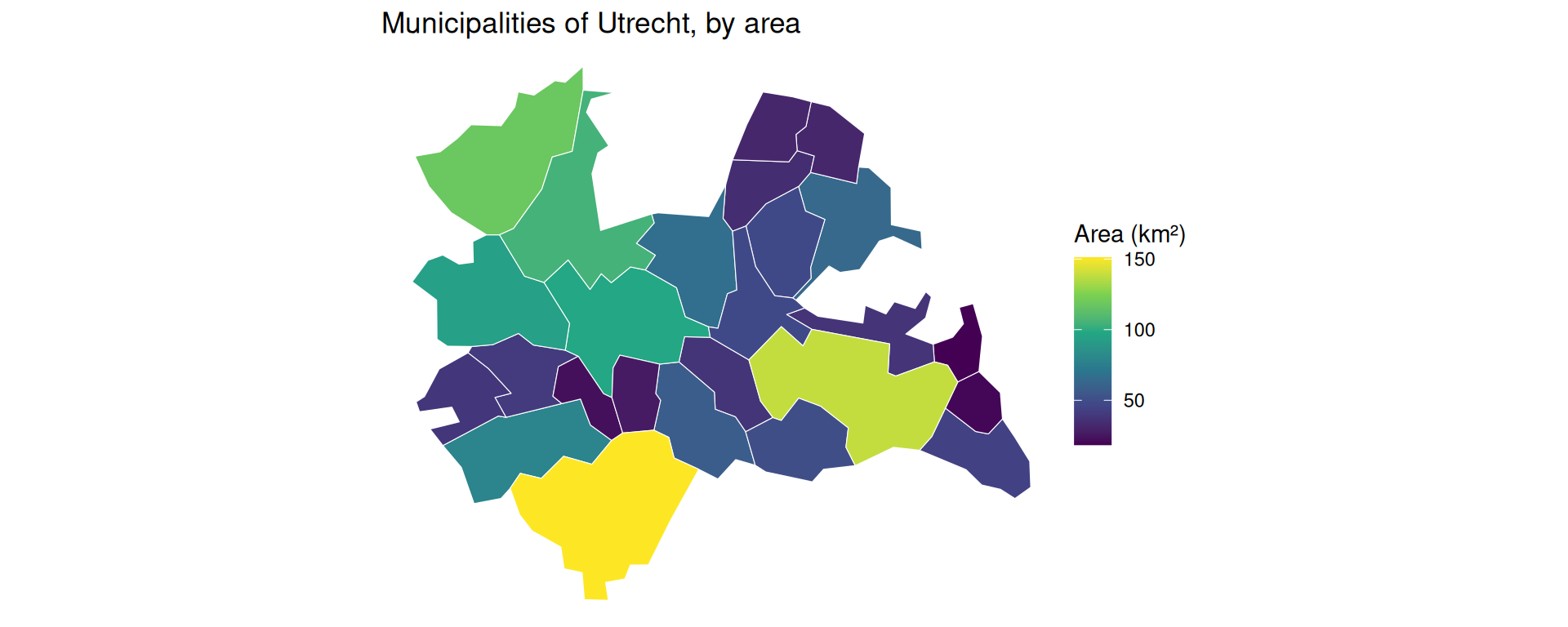
Making Maps with geom_sf()

  • A map is just a ggplot. We use geom_sf() and map an attribute to the fill colour.
utrecht <- utrecht |>
  mutate(area_km2 = as.numeric(st_area(geometry)) / 1e6)

ggplot(utrecht) +
  geom_sf(aes(fill = area_km2), colour = "white") +
  scale_fill_viridis_c(name = "Area (km²)") +
  theme_void() +
  labs(title = "Municipalities of Utrecht, by area")

Anatomy of a Map

  • The only new ingredient is geom_sf(), which reads the geometry column and draws the shapes:
ggplot(utrecht) +                          # 1. the sf data frame
  geom_sf(aes(fill = area_km2)) +          # 2. draw geometry, fill by a column
  scale_fill_viridis_c(name = "Area") +    # 3. a colour scale
  theme_void() +                           # 4. drop the grey grid
  labs(title = "...")                      # 5. titles
  • Everything else is the ordinary grammar of ggplot2.
    • To fill by a different variable (say population), you would simply write aes(fill = population): the same call with a different column.

Coordinate Reference Systems

Why Coordinates Need a System

  • We have made maps without asking a sneaky question: what do the coordinates actually mean?
  • The Earth is round, but a map is flat. To flatten it, we use a Coordinate Reference System (CRS).
    • A CRS is a rule for turning positions on the globe into x/y numbers.
  • Think of peeling an orange and pressing the peel flat on a table: you cannot do it without tearing or stretching.
    • Every flat map is a compromise. It distorts area, or shape, or distance.

Two Types of CRS

  • There are two kinds you must be able to tell apart:
    • Geographic CRS: longitude/latitude in degrees. Like a global address system: great for saying where something is.
      • The famous one is EPSG:4326 (the GPS / WGS84 system).
    • Projected CRS: a flat grid measured in metres. Like a local blueprint: flat and measurable with a ruler, but only honest over a limited area.
      • For the Netherlands the standard is EPSG:28992 (the “Rijksdriehoek” national grid).
  • The key trap: a degree is not a metre.
    • One degree of latitude is about 111 km; one degree of longitude shrinks from 111 km at the equator to 0 at the poles.

The Golden Rule: Match the CRS

  • Two layers must share the same CRS before you combine them.
  • It is a ritual: before any operation that touches two spatial datasets, check both.
    • st_crs() checks the CRS.
    • st_transform() converts coordinates to another CRS (it actually moves the points).
st_crs(utrecht)$input          # what CRS are we in?
[1] "EPSG:28992"
  • For measuring (distances, buffers) we transform to a metre-based CRS first.

A Common Pitfall: Degrees vs. Metres

  • What happens if you ignore the rule and measure distance in degrees instead of metres?
    • You get a number, but it is meaningless: “0.34 degrees” is not a distance you can act on.
    • Worse, it stretches differently north–south than east–west.
  • A modern note: since sf version 1.0, areas and distances on lon/lat are computed on the sphere and come out correct in metres.
    • But buffers still misbehave on lon/lat, so for the next steps we transform to metres first.

Where Is It? Spatial Joins

The Problem: No Common ID

  • Suppose we have a handful of places (points) in the province, and we want to know which municipality each one falls in.
  • The two datasets share no common ID column.
    • The points only have coordinates; the municipalities only have shapes.
    • A normal left_join() cannot help us here.
  • We need a spatial join: match rows by where they are, not by a shared key.

Example: Joining Points to Municipalities

Example: Spatial Join

First, build a small, fully reproducible set of well-known places as an sf object with st_as_sf(). Note the ritual: we set the points to EPSG:4326, then transform them to match utrecht.

places <- tibble::tribble(
  ~name,          ~lon,   ~lat,
  "Utrecht CS",   5.110,  52.089,
  "Amersfoort",   5.387,  52.156,
  "Zeist",        5.233,  52.089,
  "Veenendaal",   5.558,  52.027,
  "Woerden",      4.883,  52.085
) |>
  st_as_sf(coords = c("lon", "lat"), crs = 4326) |>
  st_transform(st_crs(utrecht))   # match the municipalities' CRS!

places
Simple feature collection with 5 features and 1 field
Geometry type: POINT
Dimension:     XY
Bounding box:  xmin: 120441.2 ymin: 448753.5 xmax: 166721.9 ymax: 463092.1
Projected CRS: Amersfoort / RD New
# A tibble: 5 × 2
  name                  geometry
* <chr>              <POINT [m]>
1 Utrecht CS (136001.7 455673.9)
2 Amersfoort (154986.1 463092.1)
3 Zeist      (144431.6 455648.9)
4 Veenendaal (166721.9 448753.5)
5 Woerden    (120441.2 455312.6)

We can plot the points on top of the municipalities:
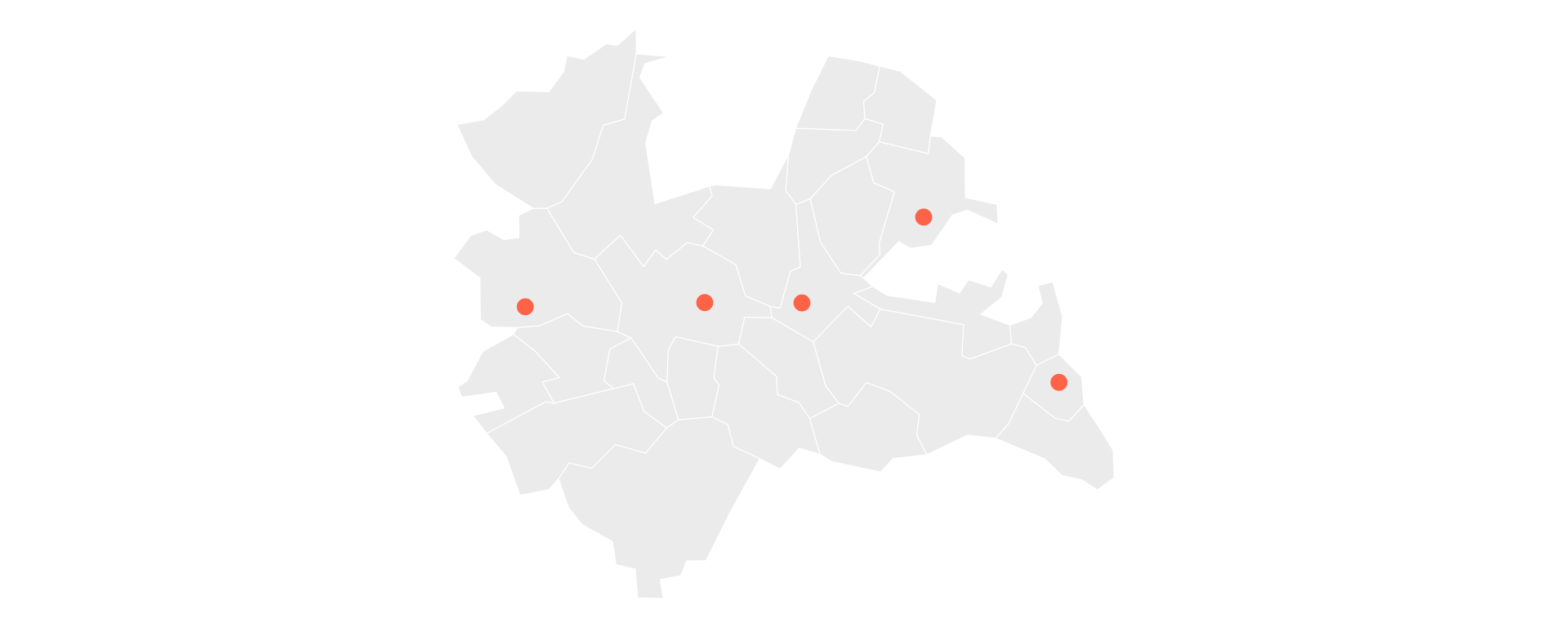
ggplot() +
  geom_sf(data = utrecht, fill = "grey92", colour = "white") +
  geom_sf(data = places, colour = "tomato", size = 3) +
  theme_void()

st_join() works like left_join(), but it matches a point to the polygon that contains it:

places_in_muni <- st_join(places, utrecht["statnaam"])

places_in_muni |>
  st_drop_geometry()
# A tibble: 5 × 2
  name       statnaam  
* <chr>      <chr>     
1 Utrecht CS Utrecht   
2 Amersfoort Amersfoort
3 Zeist      Zeist     
4 Veenendaal Veenendaal
5 Woerden    Woerden   

Each point now carries the name of the municipality it sits in, matched purely by location.

Counting Points per Municipality

  • Once joined, the result is an ordinary data frame again, so we can summarize it.
  • To count how many places fall in each municipality, we join and then count():
st_join(places, utrecht["statnaam"]) |>
  st_drop_geometry() |>
  count(statnaam, sort = TRUE)
# A tibble: 5 × 2
  statnaam       n
  <chr>      <int>
1 Amersfoort     1
2 Utrecht        1
3 Veenendaal     1
4 Woerden        1
5 Zeist          1

How Far? Distance and Buffers

Measuring Distance

  • “How far is each town from Utrecht Centraal? And which town is nearest to which?”
  • These are continuous questions (a number in metres), unlike the yes/no questions we will see next.
  • The tool is st_distance().
    • Give it two sets of points and it returns a distance matrix: every pairwise distance.

Example: Distance Matrix

  • Because our data is in a metre-based CRS, the distances come back in metres:
dist_matrix <- st_distance(places, places)

# distances from Utrecht CS (row 1) to the others, in km
round(as.numeric(dist_matrix[1, ]) / 1000, 1)
[1]  0.0 20.4  8.4 31.5 15.6
  • Row i, column j is the distance from place i to place j.
    • The first number is 0: that is Utrecht CS to itself. In general the diagonal is zero.

Nearest Neighbour

  • Which place is closest to each one? For each row we want the smallest distance other than the self-distance of zero.
  • The clean trick is to set the diagonal to Inf first, then take the minimum:
d <- dist_matrix
diag(d) <- Inf                          # ignore each place's distance to itself
closest_idx <- apply(d, 1, which.min)   # index of nearest place per row

tibble::tibble(
  place   = places$name,
  nearest = places$name[closest_idx]
)
# A tibble: 5 × 2
  place      nearest   
  <chr>      <chr>     
1 Utrecht CS Zeist     
2 Amersfoort Zeist     
3 Zeist      Utrecht CS
4 Veenendaal Amersfoort
5 Woerden    Utrecht CS
  • Setting the diagonal to Inf avoids a classic bug: subsetting the row first (x[x > 0]) would shift all the indices and mislabel the neighbour.

Buffers: A Zone of Influence

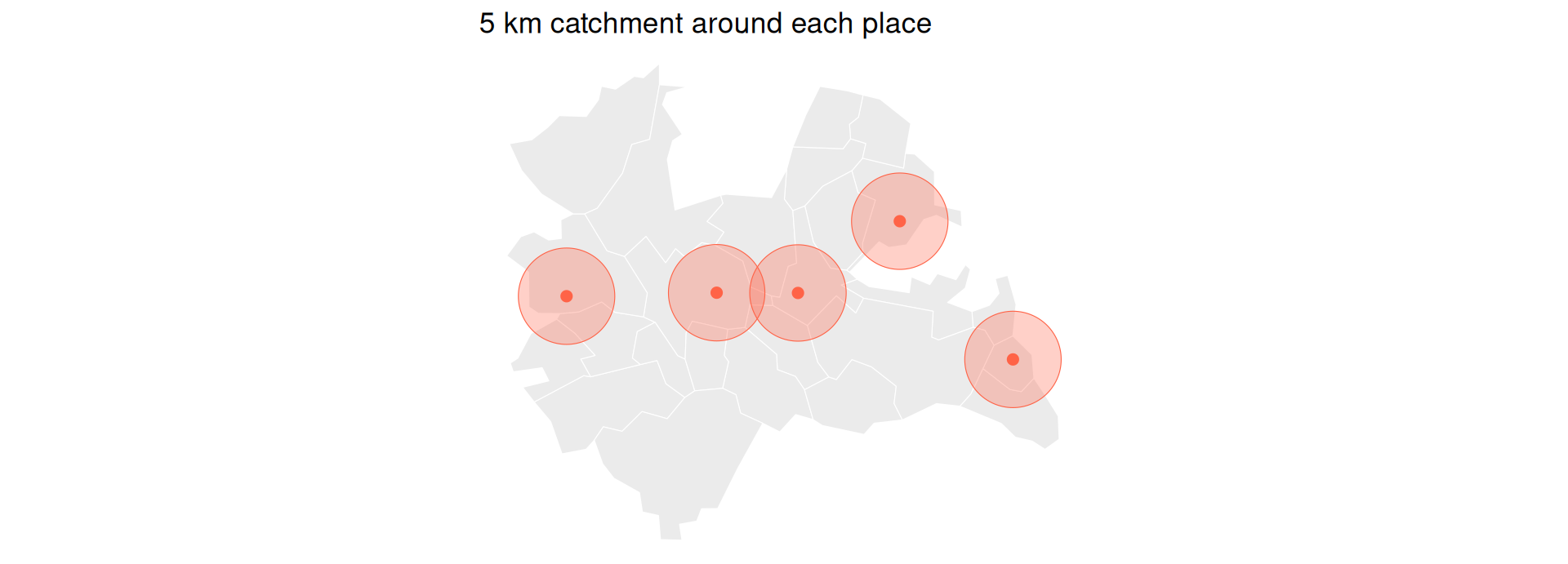
  • A buffer draws a circle of a given radius around each point: its catchment area (think of a compass drawing a circle).
  • A compass needs a ruler in metres, so the data must be in a projected CRS first.
    • Our places are already in EPSG:28992 (metres), so a 5 km buffer is just st_buffer(5000).
catchments <- st_buffer(places, 5000)   # 5 km circles

ggplot() +
  geom_sf(data = utrecht, fill = "grey92", colour = "white") +
  geom_sf(data = catchments, fill = "tomato", alpha = 0.3, colour = "tomato") +
  geom_sf(data = places, colour = "tomato", size = 2) +
  theme_void() +
  labs(title = "5 km catchment around each place")
Why Buffers Need a Projected CRS

  • Had we left places in lon/lat (degrees) and written st_buffer(5000), R would try to draw a 5000-degree circle.
    • That is nonsense, and it would be stretched north–south.
  • This is the single most common spatial bug.
  • The rule: transform to a metre-based CRS first, then buffer in metres.

What Touches? Spatial Predicates

Topological Relations

  • A spatial predicate asks a yes/no question about two geometries:
    • Is this point inside that polygon? Use st_within() or st_intersects().
    • Do these two areas touch (share a border)? Use st_touches().
    • Are they within 2 km of each other? Use st_is_within_distance().
  • Unlike st_distance() (which returns a number), a predicate returns TRUE/FALSE.

Example: Which Places Are Inside the City?

  • st_intersects() checks each place against the city polygon:
inside_city <- st_intersects(places, utrecht_city, sparse = FALSE)

tibble::tibble(
  place         = places$name,
  in_utrecht_city = as.logical(inside_city)
)
# A tibble: 5 × 2
  place      in_utrecht_city
  <chr>      <lgl>          
1 Utrecht CS TRUE           
2 Amersfoort FALSE          
3 Zeist      FALSE          
4 Veenendaal FALSE          
5 Woerden    FALSE          
  • sparse = FALSE gives a plain TRUE/FALSE matrix, which is easiest for beginners.
    • The default sparse = TRUE returns only the matching pairs, which is faster for large data.

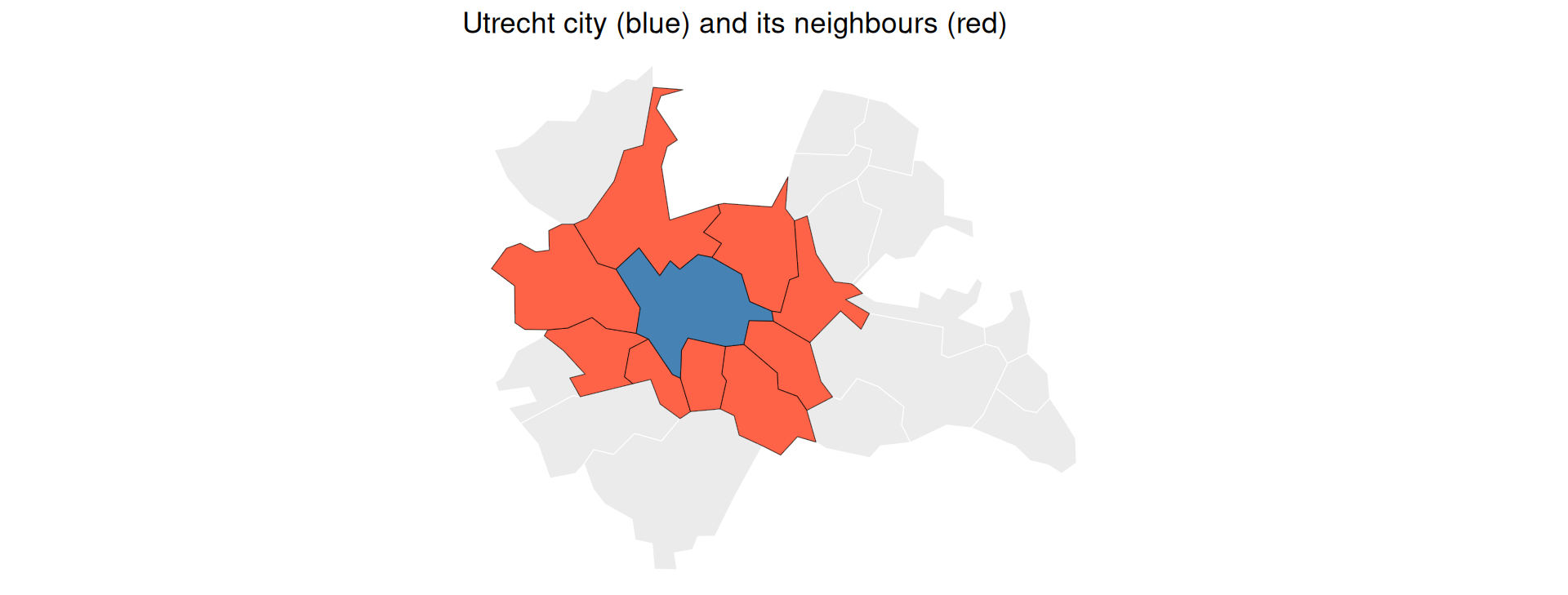
Example: Which Municipalities Border the City?

  • st_touches() finds polygons that share a border with the city of Utrecht:
neighbours <- st_touches(utrecht_city, utrecht, sparse = FALSE)

ggplot() +
  geom_sf(data = utrecht, fill = "grey92", colour = "white") +
  geom_sf(data = utrecht[as.vector(neighbours), ], fill = "tomato") +
  geom_sf(data = utrecht_city, fill = "steelblue") +
  theme_void() +
  labs(title = "Utrecht city (blue) and its neighbours (red)")
Within a Distance

  • “Which places are within 10 km of Utrecht Centraal?”
utrecht_cs <- places |> filter(name == "Utrecht CS")

near_cs <- st_is_within_distance(places, utrecht_cs,
                                 dist = 10000, sparse = FALSE)

places$name[as.vector(near_cs)]
[1] "Utrecht CS" "Zeist"     

Common Spatial Predicates

Predicate Plain-language question Everyday example
st_intersects() Do they overlap at all? Which shops fall in this district?
st_within() Is A fully inside B? Homes within the city limits
st_touches() Do they share a border? Which neighbourhoods border mine?
st_disjoint() Are they fully apart? Towns with no station nearby
st_is_within_distance() Within X metres? Cafés within 500 m of campus

I Only Have a Name: Geocoding

From a Name to Coordinates

  • Sometimes you start with no spatial data at all, just a place name, like a column of addresses you scraped.
  • Geocoding turns a name into coordinates.
  • The osmdata package can look up a place’s bounding box from OpenStreetMap with getbb():
library(osmdata)
bb <- getbb("Utrecht, The Netherlands")
bb
        min       max
x  4.970096  5.195155
y 52.026282 52.142051
  • This returns a 2x2 box: the min/max longitude and latitude that enclose the place.
    • This is a live web lookup, so it needs a network connection.

From a Name to a Point

  • Take the centre of that box and turn it into an sf point with st_as_sf():
centre <- data.frame(
  lon = mean(bb["x", ]),
  lat = mean(bb["y", ])
)

st_as_sf(centre, coords = c("lon", "lat"), crs = 4326)
Simple feature collection with 1 feature and 0 fields
Geometry type: POINT
Dimension:     XY
Bounding box:  xmin: 5.082626 ymin: 52.08417 xmax: 5.082626 ymax: 52.08417
Geodetic CRS:  WGS 84
                   geometry
1 POINT (5.082625 52.08417)
  • This is how you bootstrap a spatial analysis from a plain list of place names, connecting directly to the scraping and API skills from earlier lectures.
    • For full street-address geocoding, the tidygeocoder package is the dedicated tool.

Raster Data with stars

Back to the Grid

  • Recall that a raster is a grid of values, like a geo-located photo.
  • The stars package (spatiotemporal arrays) handles rasters and works together with sf and the tidyverse.
library(stars)
  • We will look at one satellite image to see what a raster is, then do the one raster job you are most likely to need: summarizing a raster over polygons.

Reading Raster Data

  • read_stars() loads raster files (GeoTIFF, NetCDF, and more).
  • Here is a small Landsat satellite scene that ships with stars:
tif <- system.file("tif/L7_ETMs.tif", package = "stars")
landsat <- read_stars(tif)
landsat
stars object with 3 dimensions and 1 attribute
attribute(s):
             Min. 1st Qu. Median     Mean 3rd Qu. Max.
L7_ETMs.tif     1      54     69 68.91242      86  255
dimension(s):
     from  to  offset delta                     refsys point x/y
x       1 349  288776  28.5 SIRGAS 2000 / UTM zone 25S FALSE [x]
y       1 352 9120761 -28.5 SIRGAS 2000 / UTM zone 25S FALSE [y]
band    1   6      NA    NA                         NA    NA    
  • The printout shows the attribute (the values), the dimensions (x, y, and band), and the grid’s extent.

Understanding Bands

  • A band is one “layer” of light the satellite sensor records.
  • Just as your phone camera has separate sensors for red, green, and blue to build a colour photo, a satellite captures several bands.
    • These include light our eyes cannot see, such as infrared, which is useful for measuring vegetation.
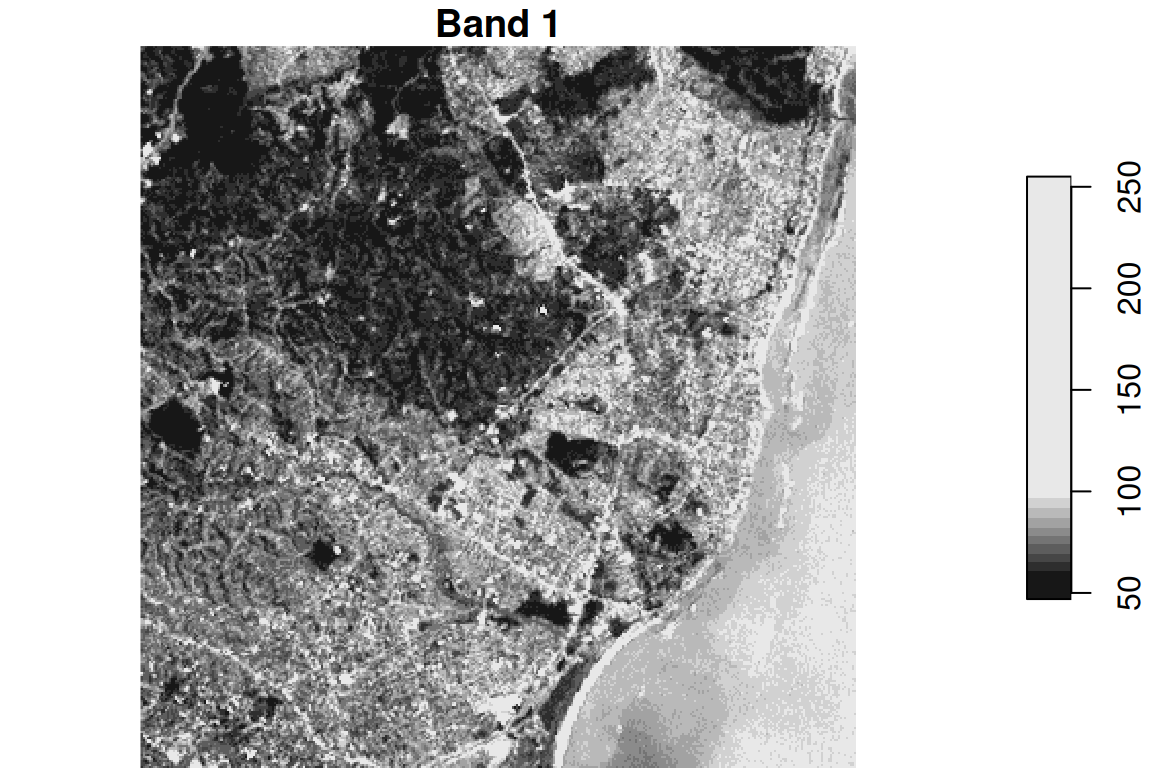
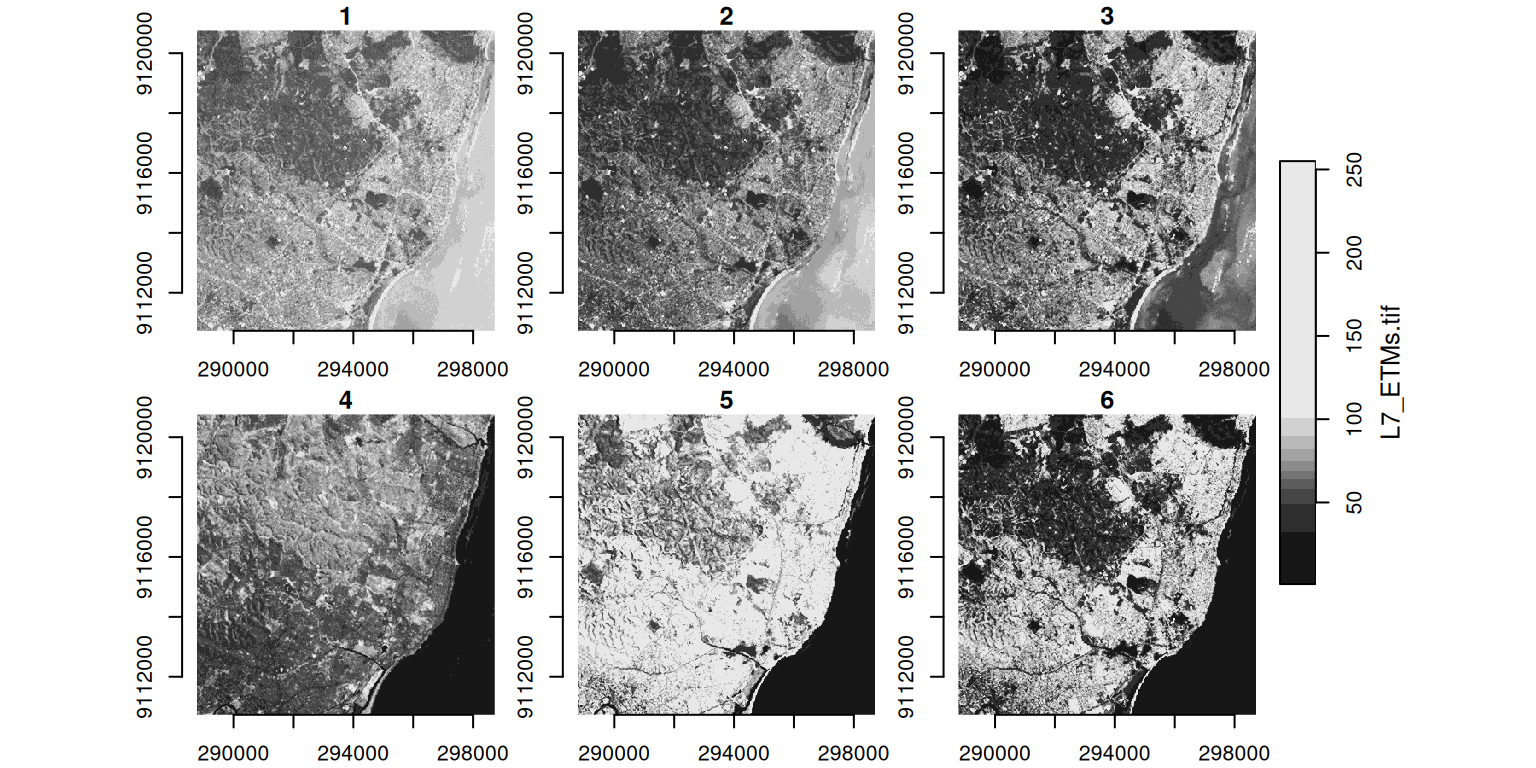
plot(landsat[ , , , 1], main = "Band 1")   # the 1st band only

Plotting All Bands

  • By default, plot() shows every band side by side:
plot(landsat, axes = TRUE)

Subsetting and Cropping

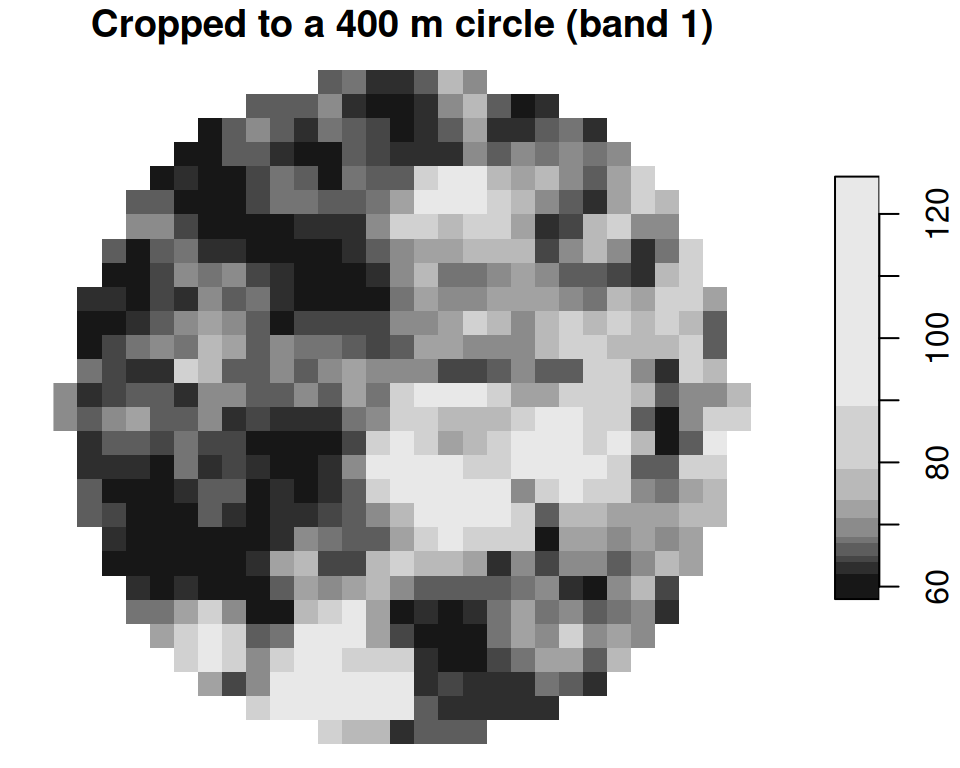
  • You can slice a raster by index (like an array) or crop it to a spatial shape:
# By index: top-left 100×100 cells, first 3 bands
small <- landsat[ , 1:100, 1:100, 1:3]
dim(small)
   x    y band 
 100  100    3 
# By shape: keep only what falls inside a circle.
# The point c(293750, 9115745) sits inside the scene, in the image's own CRS.
circle <- st_buffer(st_point(c(293750, 9115745)), 400) |>
  st_sfc(crs = st_crs(landsat))
landsat_crop <- landsat[circle]

plot(landsat_crop[ , , , 1], main = "Cropped to a 400 m circle (band 1)")
From Raster to Polygons

  • The raster job you will actually use most: summarizing a continuous surface to administrative areas.
    • For example, average rainfall per municipality.
  • The tool is aggregate(raster, polygons, fn): it summarizes the cells inside each polygon.
  • This is the natural bridge between the two halves of the lecture: a raster goes in, and one number per polygon comes out, ready to map.

Example: Precipitation per Municipality

Example: Aggregating a Raster over Polygons

We pull daily precipitation over part of the Netherlands from easyclimate, then average it to municipalities.

library(easyclimate); library(cbsodataR)

# A region of the Netherlands as polygons (in lon/lat for the climate API)
region_nl <- cbs_get_sf("nuts1", 2016) |>
  st_transform(4326) |>
  dplyr::filter(statcode == "NL2")

Get the raster of daily precipitation:

precip <- get_daily_climate(
  region_nl,
  climatic_var = "Prcp",
  period = c("2022-01-01", "2022-01-05"),
  output = "raster"
) |>
  st_as_stars()

names(precip) <- "prcp"   # name the value: precipitation
precip
stars object with 3 dimensions and 1 attribute
attribute(s):
      Min. 1st Qu. Median     Mean 3rd Qu.  Max.   NAs
prcp  1.56     2.9    3.7 4.530697    5.06 15.89 27886
dimension(s):
     from  to offset     delta refsys                 values x/y
x       1 249      5  0.008333 WGS 84                   NULL [x]
y       1 135  52.86 -0.008333 WGS 84                   NULL [y]
band    1   2     NA        NA     NA 2022-01-01, 2022-01-05    

The five days, side by side:
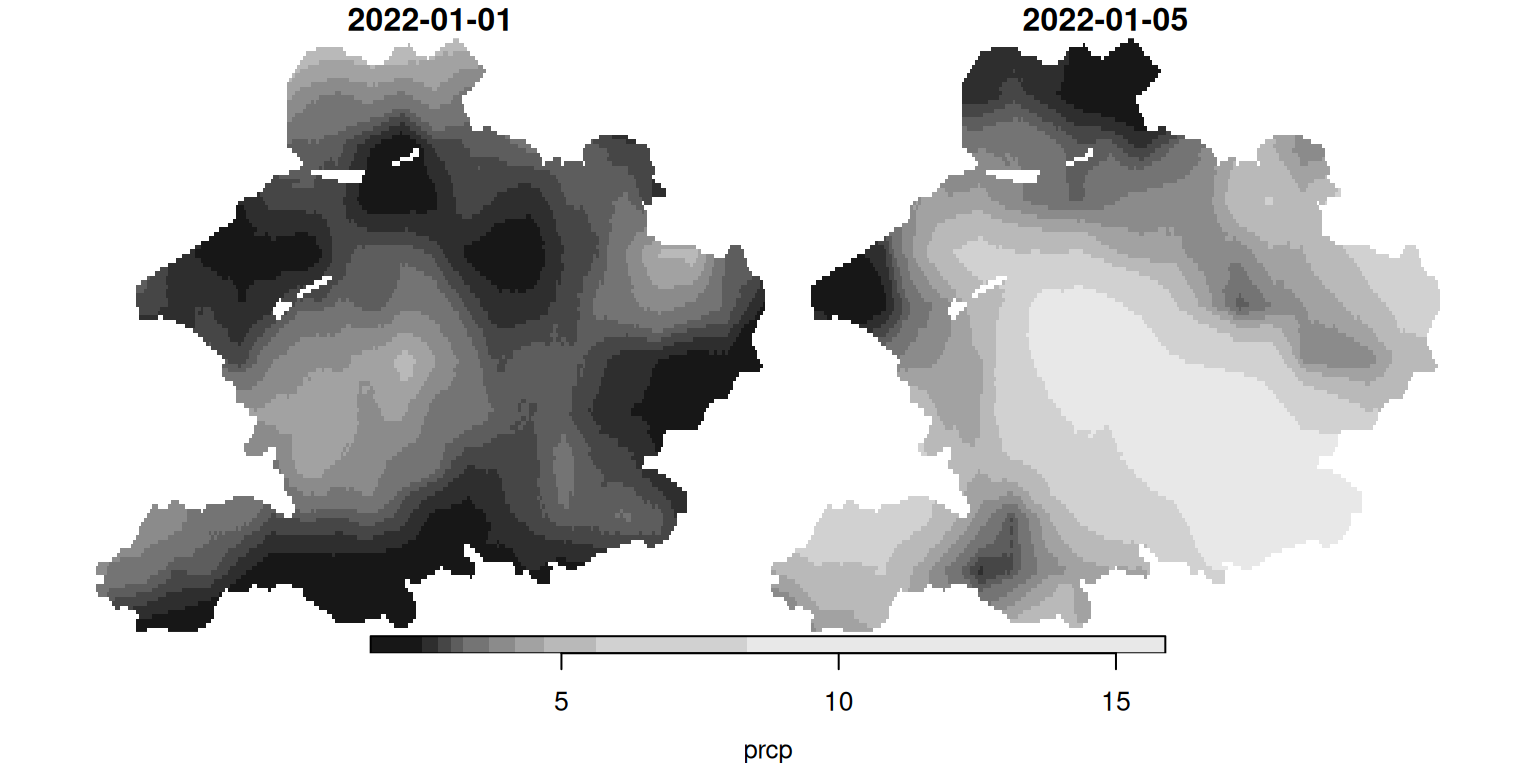
plot(precip)   # the five days, side by side

Now aggregate to municipalities. Averaging the cells inside each polygon only summarizes values; it never measures a distance or area, so we do not need a metre-based CRS here, and we can keep everything in lon/lat to match the raster.

gemeenten16 <- cbs_get_sf("gemeente", 2016) |>
  st_transform(4326)

# index the time dimension by POSITION (the 1st day) — robust to how the
# date labels are stored, unlike slicing by a "2022-01-01" character label
avg_precip <- aggregate(precip[ , , , 1], gemeenten16, mean)

# aggregate() keeps the rows in the same order as the `by` polygons,
# so we can drop the number straight back onto the vector layer
gemeenten16$prcp <- avg_precip$prcp

We now have one number per municipality, derived from the raster, which we can map like any other attribute:
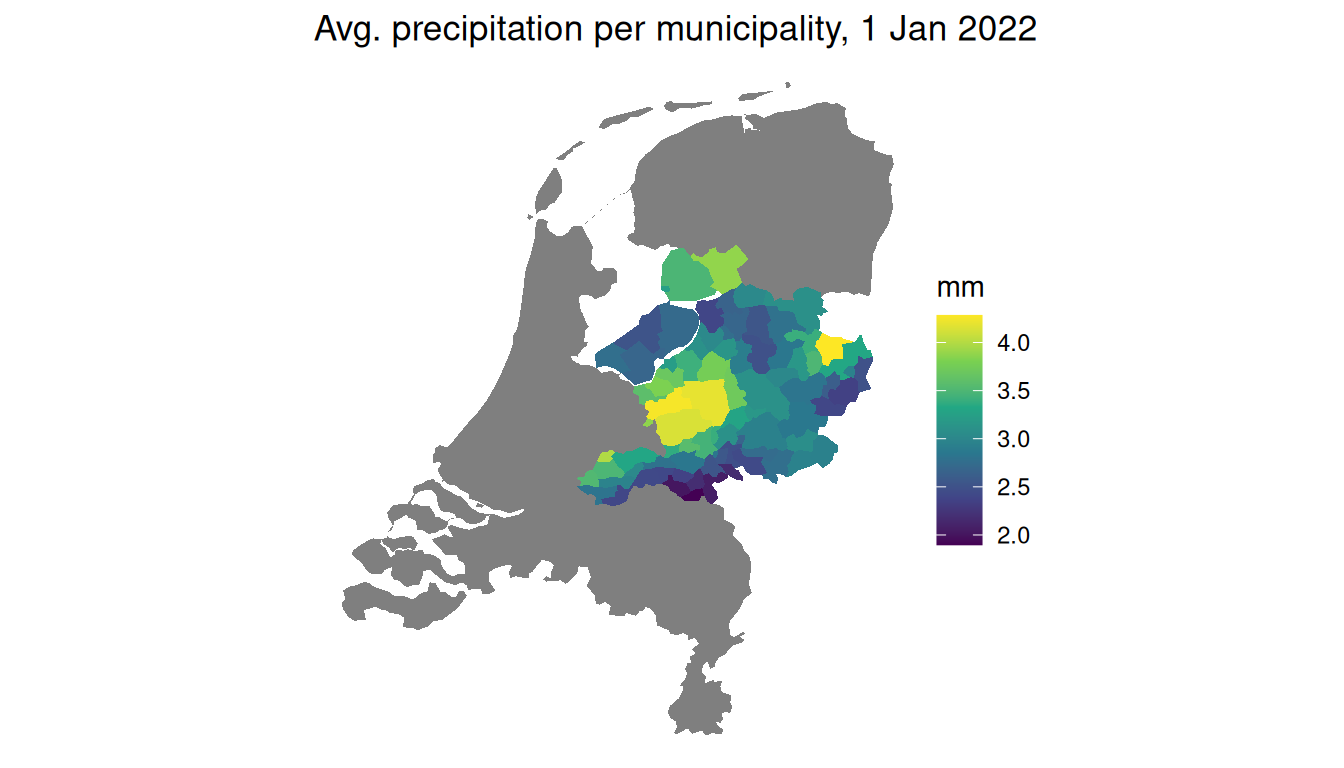
ggplot(gemeenten16) +
  geom_sf(aes(fill = prcp), colour = NA) +
  scale_fill_viridis_c(name = "mm") +
  theme_void() +
  labs(title = "Avg. precipitation per municipality, 1 Jan 2022")

A raster, summarized into a vector map: the workflow you will reach for again and again.

Wrapping Up

Where to Find Spatial Data

  • A short, curated starter list of R packages:
    • cbsodataR: Dutch official statistics with municipality and region geometries.
    • rnaturalearth: country, state, and province boundaries worldwide.
    • osmdata: points of interest from OpenStreetMap (shops, cafés, stations).
    • geodata: climate, elevation, land use, and administrative boundaries.
    • spData: ready-made teaching datasets.
  • More at my website.

A Few Honest Caveats

  • A few things bite almost everyone:
    • Spatial data is big. A national raster can be hundreds of megabytes, so crop early.
    • CRS mismatches are silent. Two layers in different systems will run and give wrong answers, so always check both first.
    • Buffers and distances need metres. Transform to a projected CRS before measuring.
  • When in doubt, plot it. If a map looks wrong, it usually is.

Spatial Thinking in Research (Optional)

  • You do not need this for the exam, but it shows where the ideas lead.
  • Spatial thinking has driven discoveries long before modern statistics, sometimes just by mapping points and looking for a cluster.
  • The classic example is John Snow’s cholera map.
    • In 1854, John Snow plotted cholera deaths in London as dots and noticed they clustered tightly around one water pump on Broad Street.
    • Mapping the deaths next to the pump locations, a spatial way of asking what is near what, pinpointed the source and helped found modern epidemiology.

Recapitulation

Recapitulation

  • Spatial data carries location, and it comes in two kinds:
    • Vector data (discrete points, lines, and polygons).
    • Raster data (a grid of continuous values).
  • An sf object is just a data frame with a geometry column, so select(), filter(), mutate(), and ggplot() all work on it.
  • A CRS is the “units” of a map.
    • Geographic (degrees) is not the same as projected (metres), and two layers must share a CRS before you combine them.

Recapitulation

  • With sf you can now answer four kinds of “where” questions:
    • Where is it? with st_join() (which municipality is each place in).
    • How far? with st_distance() and st_buffer() (nearest town, catchments).
    • What touches or is inside? with st_intersects(), st_touches(), and st_is_within_distance().
    • Name to point? with getbb() and st_as_sf() (geocoding).
  • With stars you can read a raster and aggregate() it to polygons for one number per area.
  • In the tutorial: try these tools on your own home town – map your municipality, find its neighbours, and find the nearest train station.